25 November 2015

Removing Duplicate Records In a table

Different Removes the duplicate Records from a table,

Option 1. By excluding the minimum row id from the group of duplicate records.

DELETE FROM test1
      WHERE ROWID NOT IN (  SELECT MIN (ROWID)
                              FROM test1
                          GROUP BY rc_no);


Option 2. Using row_number() option.

DELETE FROM test1
      WHERE ROWID IN (SELECT row_id
                        FROM (SELECT ROWID row_id,
                                     x,
                                     y,
                                     z,
                                     ROW_NUMBER ()
                                     OVER (PARTITION BY x, y, z ORDER BY x)
                                        rn
                                FROM test1)
                       WHERE rn > 1)

17 November 2015

Top 12 New Features of Oracle 12c as a developer,


01. Pluggable Databases Through Database Consolidation:
Oracle is doing every thing to jump into the cloud bandwagon. With 12C, Oracle is trying to address the problem of Multitenancy through this feature. There is a radical change and a major change in the core database architecture through the introduction of Container Databases also called CBD and Pluggable Databases (PDB). The memory and process is owned by the Container Database. The container holds the metadata where the PDBs hold the user data. You can create upto 253 PDBs including the seed PDB.

In a large setup, it is common to see 20 or 30 different instances running in production environment. With these many instances, it is a maintenance nightmare as all these instances have to be separately

•Upgraded
•Patched
•Monitored
•Tuned
•RAC Enabled
•Adjusted
•Backed up and
•Data Guarded.

With Pluggable Databases feature, you just have to do all this for ONE single instance. Without this feature, prior to 12C, you would have to create separate schemas and there is always a thread of security how much ever the isolation we build into it. There are problems with namespace conflicts, there is always going to be one public synonym that you can create. With PDBs you can have a separate HR or Scott schema for each PDB, separate Emp, Dept Tables and separate public synonyms. Additionally, 2 PDBs can talk to each other through the regular DB Link feature. There is no high startup cost of creating a database any more. Instead of one instance per day, the shift is into one instance per many databases. For the developer community, you can be oblivious of all this and still continue to use the PDBs as if it were a traditional database, but for the DBAs the world would look like it has changed a lot.

Another cool feature is, you can allocate a CPU percentage for each PDB.

Another initiative being, it has announced a strategic tieup with salesforce.com during the first week of July 2013.

02. Redaction Policy:
This is one of the top features in Oracle 12C. Data Redaction in simple terms means, masking of data. You can setup a Data Redaction policy, for example SSN field in a Employee table can be masked. This is called redaction. From Sql Develop you can do this by going to the table: Employee->Right click on Security Policy->click on New->click on Redaction Policy->Enter SSN.
When you do a select * from employee, it will show that the SSN is masked.
The new data masking will use a package called DBMS_REDACT. It is the extension to the FGAC and VPD present in earlier versions.
By doing this, whoever needs to view the data will be able to see it where as the other users will not be able to view it.

03. Top N Query and Fetch and offset Replacement to Rownum:
With the release of Oracle Database 12c, Oracle has introduced this new SQL syntax to simplify fetching the first few rows. The new sql syntax "Fetch First X Rows only" can be used.

04. Adaptive Query Optimization and Online Stats Gathering:
With this feature, it helps the optimizer to make runtime adjustments to execution plan which leads to better stats. For statements like CTAS (Create Table As Select) and IAS (Insert As Select), the stats is gathered online so that it is available immediately.

05. Restore a Table easily through RMAN:
Earlier if you had to restore a particular table, you had to do all sorts of things like restoring a tablespace and or do Export and Import. The new restore command in RMAN simplifies this task.

06. Size Limit on Varchar2, NVarchar2, Raw Data Types increased:
The previous limit on these data types was 4K. In 12C, it has been increased to 32,767 bytes. Upto 4K, the data is stored inline. I am sure everyone will be happy with this small and cute enhancement.

07. Inline PL/SQL Functions and Procedures:
The in line feature is extended in Oracle 12C. In addition to Views, we can now have PL/SQL Procedures and Functions as in line constructs. The query can be written as if it is calling a real stored procedure, but however the functions do not actually exist in the database. You will not be able to find them in ALL_OBJECTS. I think this will be a very good feature for the developers to explore as there is no code that needs to be compiled.

08. Generated as Identity/Sequence Replacement:
You can now create a col with 'generated as identity' clause. Thats it. Doing this is equivalent to creating a separate sequence and doing a sequence.nextval for each row. This is another handy and a neat feature which will help developer community. This is also called No Sequence Auto Increment Primary Key.

09. Multiple Indexes on a Single Column:
Prior to 12C, a column cant be in more than one index. In 12C, you can include a column in B-tree index as well as a Bit Map index. But, please note that only one index is usable at a given time.

10. Online Migration of Table Partition or Sub Partition:
You can very easily migrate a partition or sub partition from one tablespace to another. Similar to how the online migration was achieved for a non-partitioned table in prior releases, a table partition or sub partition can be moved to another tablespace online or offline. When an ONLINE clause is specified, all DML operations can be performed without any interruption on the partition|sub-partition which is involved in the procedure. In contrast, no DML operations are allowed if the partition|sub-partition is moved offline.

11. Temporary UNDO:
Prior to 12C, undo records generated by TEMP Tablespace is stored in the undo tablespace. With Temp undo feature in 12C, temp undo records can be stored in temporary table instead of UNDO TS. The benefit is - reduced undo tablespace and reduced redo log space used.

SQL> ALTER SYSTEM SET PGA_AGGREGATE_LIMIT=2G;
SQL> ALTER SYSTEM SET PGA_AGGREGATE_LIMIT=0; --disables the hard limit

12. In Database Archiving:
This feature enables archiving rows within a table by marking them as inactive. These inactive rows are in the database and can be optimized using compression but are not visible to the application. These records are skipped during FTS (Full Table Scan).

Other Features:
Advanced Replication and Streams are Dead. It is being replaced with Oracle Golden Gate.

Invisible Columns. You can now have a invisible column in a table. When a column is defined as invisible, the column won’t appear in generic queries

PGA Aggregate Limit setting:

In 12c, you can set a hard limit on PGA by enabling the automatic PGA management, which requires PGA_AGGREGATE_LIMIT parameter settings. Therefore, you can now set the hard limit on PGA by setting the new parameter to avoid excessive PGA usage.

DDL Logging:

The DDL statements will automatically get recorded in xml/log file if ENABLE_DDL_LOGGING is set to True. ALTER SYSTEM|SESSION SET ENABLE_DDL_LOGGING=TRUE

Source :  www.ondemanddb.com

09 November 2015

Override default workflow template


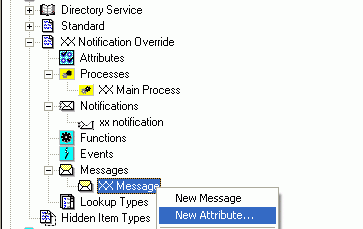
Create a custom version of the Standard System Mailer Workflow


Open the System: Mailer


Save it as XXSYSML

Open its wft in textpad and search and repace WFMAIL by XXSYSML

Now open this XXSYSML.wft file and change the Name of Workflow from "System: Mailer" to "XX System: Mailer"

Now you can modify the templates within this workflow as desired.


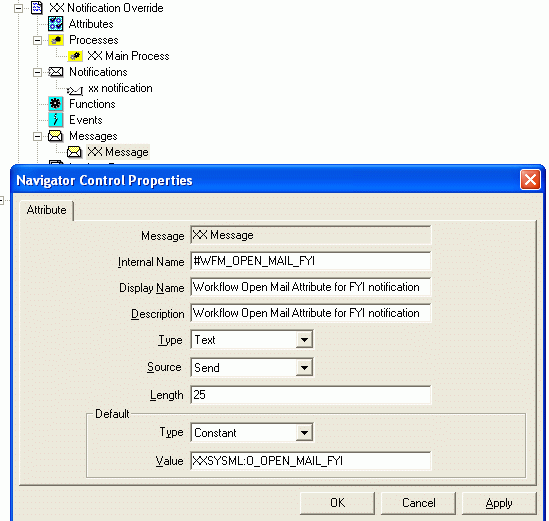
Now, go back to your PO Approval Workflow and attach a new attribute of name for FYI, #WFM_OPEN_MAIL_FYI


Make the value of this attribute point to custom version of "System: Mailer" template

Source Anilpasi

Oracle SQL : Easy way to batch into equal number of datasets for batch processing.

NTILE

Syntax
Description of ntile.gif follows


NTILE is an analytic function. It divides an ordered data set into a number of buckets indicated by expr and assigns the appropriate bucket number to each row. The buckets are numbered 1 through expr. The expr value must resolve to a positive constant for each partition. Oracle Database expects an integer, and if expr is a noninteger constant, then Oracle truncates the value to an integer. The return value is NUMBER.
The number of rows in the buckets can differ by at most 1. The remainder values (the remainder of number of rows divided by buckets) are distributed one for each bucket, starting with bucket 1.
If expr is greater than the number of rows, then a number of buckets equal to the number of rows will be filled, and the remaining buckets will be empty.
You cannot use NTILE or any other analytic function for expr. That is, you cannot nest analytic functions, but you can use other built-in function expressions for expr.
See Also:
Examples
The following example divides into 4 buckets the values in the salary column of the oe.employees table from Department 100. The salary column has 6 values in this department, so the two extra values (the remainder of 6 / 4) are allocated to buckets 1 and 2, which therefore have one more value than buckets 3 or 4.


SELECT last_name, salary, NTILE(4) OVER (ORDER BY salary DESC) 
   AS quartile FROM employees
   WHERE department_id = 100;

LAST_NAME                     SALARY   QUARTILE
------------------------- ---------- ----------
Greenberg                      12000          1
Faviet                          9000          1
Chen                            8200          2
Urman                           7800          2
Sciarra                         7700          3
Popp                            6900          4 


Source : http://docs.oracle.com/cd/B19306_01/server.102/b14200/functions101.htm 

23 October 2015

How to set Workflow Mailer Override Address

Option 1 :

How to set Workflow Mailer Override Address from Backend ? (Doc ID 1533596.1)

Please use the following script $FND_TOP/sql/afsvcpup.sql

This will enable to change any and all or your Mailer components.

A. Run the script
B. It will show you the components - pick the comp id for the Workflow Mailer - default is 10006
C. then it will show you the parameters and their values for the mailer
D. Pick the comp param id for the Override address (it will say Test Address ) - default is 10093

It will show you

You have selected parameter : Test Address
Current value of parameter : NONE

Enter a value for the parameter :

Option 2

FND_SVC_COMP_PARAM_VALS_PKG.LOAD_ROW 
( x_component_name => ‘Workflow Notification Mailer’,
x_parameter_name => ‘TEST_ADDRESS’,
x_parameter_value => ‘test.mail@mail.com’
x_customization_level => ‘L’
x_object_version_number => -1,
x_owner => ‘ORACLE’
);

Commit;

Option 3

How to set "Set Override Address"?

  1. Log into Oracle Applications Manager [OAM]
  2. Navigate: Site Map / Administration tab / Workflow section / Notification Mailer / View Details / Set Override Address Button
  3. Give a valid Email Address / Submit


[OR]

  1. System Administration Responsibility
  2. Navigate: Workflow Manager / Notification Mailer / View Details / Set Override Address Button
  3. Give a valid Email Address / Submit
  4. Mailer will send an email to the new Override Address that has been entered in OAM, just to verify the email Address is valid.
  5. The email includes a Verification Code, that must be entered in OAM to confirm the new Override Address

How to clear "Set Override Address"?

Log into OAM.

Navigate: Site Map / Administration tab / Workflow section / Notification Mailer / View Details / Set Override Address Button

Click on button "Clear Override Address"


Option 4

select fscpv.parameter_value
from fnd_svc_comp_params_tl fscpt
,fnd_svc_comp_param_vals fscpv
where fscpt.display_name = 'Test Address'
and fscpt.parameter_id = fscpv.parameter_id;

update
fnd_svc_comp_param_vals fscpv
set
fscpv.PARAMETER_VALUE = ''
where
fscpv.parameter_id in (
select
fscpt.parameter_id
from
fnd_svc_comp_params_tl fscpt
where
fscpt.display_name = 'Test Address');

select fscpv.parameter_value
from fnd_svc_comp_params_tl fscpt
,fnd_svc_comp_param_vals fscpv
where fscpt.display_name = 'Test Address'
and fscpt.parameter_id = fscpv.parameter_id;

commit;

13 October 2015

Setting the tnsnames.ora in Oracle SQL Developer

Setting the tnsnames.ora in Oracle SQL Developer


Tools --> Preferences --> Database --> Advanced --> TNS Names Directory


Oracle SQL MERGE statement

Use the MERGE statement to select rows from one or more sources for update or insertion into a table or view. You can specify conditions to determine whether to update or insert into the target table or view.

This statement is a convenient way to combine multiple operations. It lets you avoid multiple INSERT, UPDATE, and DELETE DML statements.

MERGE is a deterministic statement. You cannot update the same row of the target table multiple times in the same MERGE statement.


Example
CREATE TABLE bonuses (employee_id NUMBER, bonus NUMBER DEFAULT 100);

INSERT INTO bonuses(employee_id)
   (SELECT e.employee_id FROM employees e, orders o
   WHERE e.employee_id = o.sales_rep_id
   GROUP BY e.employee_id);

SELECT * FROM bonuses ORDER BY employee_id;

EMPLOYEE_ID      BONUS
----------- ----------
        153        100
        154        100
        155        100
        156        100
        158        100
        159        100
        160        100
        161        100
        163        100

MERGE INTO bonuses D
   USING (SELECT employee_id, salary, department_id FROM employees
   WHERE department_id = 80) S
   ON (D.employee_id = S.employee_id)
   WHEN MATCHED THEN UPDATE SET D.bonus = D.bonus + S.salary*.01
     DELETE WHERE (S.salary > 8000)
   WHEN NOT MATCHED THEN INSERT (D.employee_id, D.bonus)
     VALUES (S.employee_id, S.salary*.01)
     WHERE (S.salary <= 8000);

SELECT * FROM bonuses ORDER BY employee_id;

EMPLOYEE_ID      BONUS
----------- ----------
        153        180
        154        175
        155        170
        159        180
        160        175
        161        170
        179        620
        173        610
        165        680
        166        640
        164        720
        172        730
        167        620
        171        740