Showing posts with label Oracle Apps. Show all posts

21 July 2016

How to Change/View Applet Windows Title in Oracle EBS

System Administrator responsibility and navigate to Profile > System, search for the profile name "Site Name", 

To see the value what was set,

SQL :

SELECT v.profile_option_value   FROM apps.fnd_profile_option_values v, apps.fnd_profile_options n  WHERE v.profile_option_id = n.profile_option_id AND n.profile_option_name LIKE 'SITENAME%'


To see database creation date, 

SQL

 SELECT created
from V$DATABASE;

09 November 2015

Override default workflow template


Create a custom version of the Standard System Mailer Workflow


Open the System: Mailer


Save it as XXSYSML

Open its wft in textpad and search and repace WFMAIL by XXSYSML

Now open this XXSYSML.wft file and change the Name of Workflow from "System: Mailer" to "XX System: Mailer"

Now you can modify the templates within this workflow as desired.


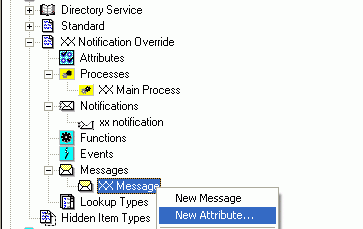
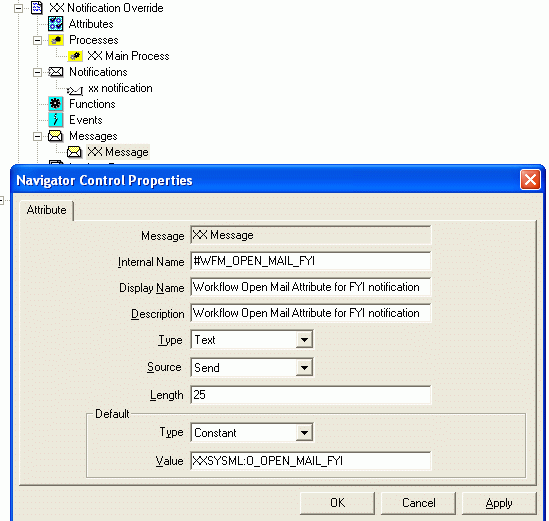
Now, go back to your PO Approval Workflow and attach a new attribute of name for FYI, #WFM_OPEN_MAIL_FYI


Make the value of this attribute point to custom version of "System: Mailer" template

Source Anilpasi

23 October 2015

How to set Workflow Mailer Override Address

Option 1 :

How to set Workflow Mailer Override Address from Backend ? (Doc ID 1533596.1)

Please use the following script $FND_TOP/sql/afsvcpup.sql

This will enable to change any and all or your Mailer components.

A. Run the script
B. It will show you the components - pick the comp id for the Workflow Mailer - default is 10006
C. then it will show you the parameters and their values for the mailer
D. Pick the comp param id for the Override address (it will say Test Address ) - default is 10093

It will show you

You have selected parameter : Test Address
Current value of parameter : NONE

Enter a value for the parameter :

Option 2

FND_SVC_COMP_PARAM_VALS_PKG.LOAD_ROW 
( x_component_name => ‘Workflow Notification Mailer’,
x_parameter_name => ‘TEST_ADDRESS’,
x_parameter_value => ‘test.mail@mail.com’
x_customization_level => ‘L’
x_object_version_number => -1,
x_owner => ‘ORACLE’
);

Commit;

Option 3

How to set "Set Override Address"?

  1. Log into Oracle Applications Manager [OAM]
  2. Navigate: Site Map / Administration tab / Workflow section / Notification Mailer / View Details / Set Override Address Button
  3. Give a valid Email Address / Submit


[OR]

  1. System Administration Responsibility
  2. Navigate: Workflow Manager / Notification Mailer / View Details / Set Override Address Button
  3. Give a valid Email Address / Submit
  4. Mailer will send an email to the new Override Address that has been entered in OAM, just to verify the email Address is valid.
  5. The email includes a Verification Code, that must be entered in OAM to confirm the new Override Address

How to clear "Set Override Address"?

Log into OAM.

Navigate: Site Map / Administration tab / Workflow section / Notification Mailer / View Details / Set Override Address Button

Click on button "Clear Override Address"


Option 4

select fscpv.parameter_value
from fnd_svc_comp_params_tl fscpt
,fnd_svc_comp_param_vals fscpv
where fscpt.display_name = 'Test Address'
and fscpt.parameter_id = fscpv.parameter_id;

update
fnd_svc_comp_param_vals fscpv
set
fscpv.PARAMETER_VALUE = ''
where
fscpv.parameter_id in (
select
fscpt.parameter_id
from
fnd_svc_comp_params_tl fscpt
where
fscpt.display_name = 'Test Address');

select fscpv.parameter_value
from fnd_svc_comp_params_tl fscpt
,fnd_svc_comp_param_vals fscpv
where fscpt.display_name = 'Test Address'
and fscpt.parameter_id = fscpv.parameter_id;

commit;

06 January 2015

SQL to fetch the SMTP server details from Workflow Setup

SQL to fetch the SMTP server details from Workflow Setup

select fscpv.parameter_value smtp_server_name,fscpt.display_name
from   fnd_svc_comp_params_tl fscpt
,      fnd_svc_comp_param_vals fscpv
,      fnd_svc_components fsc
where  fscpt.parameter_id = fscpv.parameter_id
and    fscpv.component_id = fsc.component_id
and    fscpt.display_name = 'Outbound Server Name'
and    fsc.component_name = 'Workflow Notification Mailer'

09 October 2014

How to delete XML Templete in oracle R12

Use the following code to delete a Template Code

declare
l_templateCode varchar2 (100) := ; -- Template Code
begin
for r in (select t1.application_short_name template_app_name,
t1.data_source_code,
t1.application_short_name def_app_name
from xdo_templates_b t1
where t1.template_code = l_templateCode)
loop

xdo_templates_pkg.delete_row (r.template_app_name, l_templateCode);

delete from xdo_lobs
where lob_code = l_templateCode
and application_short_name = r.template_app_name
and lob_type in ('TEMPLATE_SOURCE', 'TEMPLATE');

delete from xdo_config_values
where application_short_name = r.template_app_name
and template_code = l_templateCode
and data_source_code = r.data_source_code
and config_level = 50;

end loop;
end;

29 July 2014

Concurrent Business Events

Follow below steps to enable Business Events for concurrent jobs.

Step 1) Set the Profile Option 'Concurrent: Business Intelligence Integration Enable' to Yes.

Step 2) Enable Required business events in Concurrent Programs Definitions.

Step 3) Add the subscription to the business event

Step 4) Sample Subscription

        FUNCTION process
        (
                p_sub_guid in RAW,
                p_event in out WF_EVENT_T
        )RETURN VARCHAR2
        IS
                l_event_data            CLOB;
                l_request_id            NUMBER;
                l_sub_request_id        NUMBER;
               
                l_event_name            VARCHAR2(100);
                l_status                VARCHAR2(100)   := 'SUCCESS';
                l_err_msg               VARCHAR2(1000);
        BEGIN
                l_event_data    := p_event.GETEVENTDATA();
               
                l_event_name    := p_event.GETEVENTNAME();
               
                IF (p_event.GETEVENTNAME() = 'oracle.apps.fnd.concurrent.request.completed')
                THEN
                        l_request_id := TO_NUMBER(p_event.getvalueforparameter('REQUEST_ID'));
                END IF;
               
                IF l_request_id IS NOT NULL
                THEN
                    /* Start Custom Business Validation */   
                   
                    /* End Custom Business Validation */   
                END IF;
               
               
                COMMIT;
                RETURN (l_status);
        EXCEPTION
                WHEN OTHERS THEN
               
                        l_err_msg := SQLERRM;
                       
                        l_status := 'ERROR';
               
                        RAISE_APPLICATION_ERROR(-20003, l_err_msg);    
                       
                        COMMIT;
                       
                        RETURN (l_status);
        END process;


18 June 2014

Oracle Apps : Truncate VS Delete


Truncate will effectively just move the high water mark of a table back to "zero" and either release allocated space back to dba_free_space or keep it for the segment. It just moves a pointer and says "magically there is no data in this table". It doesn't actually touch the data, it just says "we don't have it anymore"


Delete physically deletes, row by row. It deletes from the table, it deletes the index entry. The space is not given back and the high water marks stay exactly where they are. if there were a million rows in the table, the high water mark will be at the million row mark (or above).

12 June 2014

Deleting Layout RTF Template from Data Template

Use below script TO DELETE the existing Template in BI Publisher.

  SET SERVEROUTPUT ON DECLARE
  -- Change the following two parameters
  var_templateCode VARCHAR2 (100) := 'Template Code'; -- Template Code
boo_deleteDataDef  BOOLEAN        := TRUE;            -- delete the associated Data Def.
BEGIN
  FOR RS IN
  (SELECT T1.APPLICATION_SHORT_NAME TEMPLATE_APP_NAME,
    T1.DATA_SOURCE_CODE,
    T2.APPLICATION_SHORT_NAME DEF_APP_NAME
  FROM XDO_TEMPLATES_B T1,
    XDO_DS_DEFINITIONS_B T2
  WHERE T1.TEMPLATE_CODE  = var_templateCode
  AND T1.DATA_SOURCE_CODE = T2.DATA_SOURCE_CODE
  )
  LOOP
    XDO_TEMPLATES_PKG.DELETE_ROW (RS.TEMPLATE_APP_NAME, var_templateCode);
    DELETE
    FROM XDO_LOBS
    WHERE LOB_CODE             = var_templateCode
    AND APPLICATION_SHORT_NAME = RS.TEMPLATE_APP_NAME
    AND LOB_TYPE              IN ('TEMPLATE_SOURCE', 'TEMPLATE');
    DELETE
    FROM XDO_CONFIG_VALUES
    WHERE APPLICATION_SHORT_NAME = RS.TEMPLATE_APP_NAME
    AND TEMPLATE_CODE            = var_templateCode
    AND DATA_SOURCE_CODE         = RS.DATA_SOURCE_CODE
    AND CONFIG_LEVEL             = 50;
    DBMS_OUTPUT.PUT_LINE ('Selected template has been ' || var_templateCode || ' deleted.');
  END LOOP;
  COMMIT;
EXCEPTION
WHEN OTHERS THEN
  ROLLBACK;
  DBMS_OUTPUT.PUT_LINE ( 'Unable to delete XML Publisher Template ' || var_templateCode);
  DBMS_OUTPUT.PUT_LINE (SUBSTR (SQLERRM, 1, 200));
END;
/

12 March 2014

Oracle Applications Multiple Organizations Access Control for Custom Code (Doc ID 420787.1)

Overview of Multiple Organizations Architecture (prior to Release 12)

The primary objective of multiple organizations architecture, introduced in Oracle Applications Release 10.6, is to secure data from unauthorized access by individuals belonging to different operating units in an enterprise.

A new or fresh installation of an Oracle Applications instance does not automatically enable multiple organizations. The system administrator creates operating units using the Define Organizations window in Oracle Human Resources Management System (HRMS), and runs the Convert to Multiple Organization program from AD Administrator to enable the multiple organizations feature. Typically, the system administrator defines "MO: Operating Unit" profile at Responsibility and/or User level. The "organization_id" of the "MO: Operating Unit" profile option value filters the transactional data. The CLIENT_INFO application context space stores the multiple organizations context value.

Multi-Org views use the following WHERE clause to filter application records:'org_id = substrb(userenv(''CLIENT_INFO''),1,10)'
Overview of Multiple Organizations Access Control Architecture (Release 12)

The Access Control feature in Release 12 allows the user to enter or query records in one or more operating units without changing application responsibility. It is the system administrator’s discretion to either implement the feature or use the same multiple organizations profile option setting available before Release 12 by using the single operating unit mode (i.e. one operating unit for a responsibility).

In Release 12, the multiple organizations context value is no longer initialized by the FND_GLOBAL.APPS_INITIALIZE routine thereby reducing unnecessary context setting and resource consumption for applications that do not use operating unit context for data security.

To use the single operating unit mode, you must set the value for the "Initialization SQL Statement – Custom profile" to "mo_global.init('S',null);". This initializes the operating unit context based on the "MO: Operating Unit" profile option and the "MO: Security Profile" profile option must not be set.

Fresh install of Release 12 Application is enabled with multiple organizations, however, the system administrator must create operating units to use multi organizations sensitive application products. The user can create new operating units in the Accounting Setup Manager page in addition to HRMS’s Define Organizations page.

Multiple Organizations Initialization

The profile options MO: Security Profile or MO: Operating Unit populate the multiple organizations global temporary table. The profile option MO: Security Profile takes precedence over MO: Operating Unit. You can combine the following under one application menu:
Products at different levels
Products that are access control enabled
Products that are not access control enabled (i.e. in transition)

In such cases, initializing the multiple organizations depends on the application of the calling module and not the application tied to the responsibility, since the profile Option MO: Security Profile must be ignored for products that are not access control enabled or are in the transition phase.

A new table (FND_MO_PRODUCT_INIT) is introduced which contains a value Y for products that are enabled with the multiple organizations access control feature. The multiple organizations initialization API uses the module owner to initialize the temporary table depending on the value for the product in the FND_MO_PRODUCT_INIT table.

Application_Short_NameStatus
ARY
JTFY
Y or N

Legend: Y indicates multiple organizations access control is enabled, N indicates otherwise.

Use the shared services API to register products that are enabled with access control. For example to enable or remove access control for Payables (SQLAP), enter the following code:To enable access: FND_MO_PRODUCT_INIT_PKG.register_application('SQLAP', 'SEED','Y'); To delete your application entry: FND_MO_PRODUCT_INIT_PKG.remove_application('SQLAP');

The Payables system administrator must then seed a row in the Multiple Organizations table to indicate that Payables is enabled with access control.

Products must call the MO_GLOBAL.init() API to execute the multiple organizations initialization.

Multiple organizations initialization performs the following:
Initializes the security policy predicate
Populates a global temporary table that is used in the user interfaces and the security policy function.

Attention:
Do not access the global temporary table directly. Instead, use the PL/SQL functions to access data from the temporary table.
The FND_GLOBAL.APPS_INITIALIZE routine does NOT automatically call mo_global.init routine. You must explicitly invoke the mo_global.init routine to initialize the organization context.

28 February 2014

Oracle E-Business Suite Timeout Parameters / Profiles

The following E-Business Suite profile options control screen timeouts for Forms, as well as Self Service sessions. Again, please note, some of the ICX profiles also control Forms Session timeouts! This can be confusing since Inter-Cartridge Exchange (ICX) is often associated with Self Service applications. This is no longer the case since the release of Framework for the ICX Profiles control the timeout functionality. 
Parameter
Default
Recommendation
ICX:Session Timeout
None
30 (minutes)
ICX: Limit Time
4 (hours)
4 (hours)
ICX: Limit Connect
1000
2000
ICX:Session Timeout - This profile option determines the length of time (in minutes) of inactivity in a user's form session before the session is disabled. Note that disabled does not mean terminated or killed. The user is provided the opportunity to re-authenticate and re-enable their timed-out session. If the re-authentication is successful, the disabled session is re-enabled and no work is lost. Otherwise, the session is terminated without saving pending work. This functionality is available via Patch 2012308 (included in 11.5.7, FND.E). Note: Setting the profile value to greater than 30 minutes can drain the JVM resources and cause ‘out of memory’ errors.

· ICX: Limit time - This profile option defines the maximum connection time for a connection – regardless of user activity. If 'ICX:Session Timeout' is set to NULL, then the session will last only as long as 'ICX: Limit Time', regardless of user activity.

· ICX: Limit connect - This profile option defines the maximum number of connection requests a user can make in a single session. Note that other EBS internal checks will generate connection requests during a user session, so it is not just user activity that can increment the count.

CRM Application Timeout Profile Values

CRM applications use the afore-mentioned ICX timeout profiles (ICX:Session Timeout, ICX: Limit Time, and ICX: Limit Connect), but additionally, CRM also utilizes the JTF_INACTIVE_SESSION_TIMEOUT profile option. 
Parameter
Default
Recommendation
JTF_INACTIVE_SESSION_TIMEOUT
None
30 (minutes)
JTF_INACTIVE_SESSION_TIMEOUT - This profile option affects CRM-based products only, and serves the same purpose as the ICX:Session Timeout profile. This profile option exists for legacy reasons, and its value should be set the same as ICX:Session Timeout.

Jserv (Java) Timeout Settings
Parameter
Recommendation
disco4iviewer.properties:session.timeout
5400000 (milliseconds)
formservlet.ini:FORMS60_TIMEOUT
55 (minutes)
formservlet.properties:session.timeout
5400000 (milliseconds)
jserv.conf:ApJServVMTimeout
360  (seconds)
mobile.properties:session.timeout
5400000 (milliseconds)
zone.properties:session.timeout
5400000 (milliseconds)
zone.properties:servlet.framework.initArgs
5400000 (milliseconds)
These settings are located at: ../*ora/iAS/Apache/Jserv/etc

JServ Timeout is specified by the value of the property session.timeout in the JServ configuration file zone.properties, and represents the number of milliseconds to wait before ending an idle JServ session (the default is 30 minutes). This timeout is used by products based on Oracle Applications Framework (OAF). 
 
Apache HTTP Timeout Settings

The following parameter settings control timeout behavior within Apache.

Parameter
Recommendation
httpd.conf:Timeout
300 (seconds)
httpd.conf:KeepAliveTimeout
15 (seconds)
httpd.conf:SSLSessionCacheTimeout
300 (seconds)
These settings are located: ../*ora/iAS/Apache/Apache/conf
Forms 60 Environment Timeout Variables

The following parameter settings control timeout behavior within Oracle Forms.

Parameter
Recommendation
FORMS60_TIMEOUT
55 (minutes)
FORMS60_CATCHTERM
0
You should modify the APPL_TOP/.env setting to include the following settings:

FORMS60_CATCHTERM=0
FORMS60_TIMEOUT=55 (minutes)

I recommend using a timeout value of 55 because it is less than the 60 minute value recommended for the web apache timeout values. Note that these values may vary depending on security policies.
Oracle Single Sign-On Server Timeouts

The following parameter setting controls timeout behavior within Oracle Single Sign-On.

‘Single Sign-On Session Duration’ represents the number of hours a user can be logged in to the server without being timed out and having to log in again. This timeout value can be specified from the "Edit SSO Server Configuration" link on the SSO Server Administration page. When a user logs in to Release 11i via the Single Sign-On Server, an SSO login session is created and remains valid for the duration specified by this setting.

27 February 2014

Concurrent Processing - Operating Unit LOV has no values When Submitting Concurrent Requests For MOAC Responsibility (Doc ID 837615.1)

To support this, concurrent programs are defined with an operating unit mode of 'S' for single
operating unit or 'M' for multiple operating units. This mode is set automatically during
the upgrade to release 12.

However, if you have modified the definition for any concurrent programs, the upgrade will not set
this. This is done to preserve your customizations. Depending on how you run the customized
program, you may need to set this operating unit mode.
To do this, execute the following SQL to set a concurrent program to run for a single operating
unit:

UPDATE FND_CONCURRENT_PROGRAMS
SET MULTI_ORG_CATEGORY='S'
WHERE CONCURRENT_PROGRAM_NAME = ''


Enter 'M' instead of 'S' for multiple operating units.

If you want to know which setting is appropriate for a given program, you may
review the setting in the appropriate .ldt file.
Please note, however, that if you have customized the concurrent program definition,
this setting may not be appropriate given the way you use the program.


This can also be done via Applications User Interface:


1. Login into application with System Administration responsibility (NOT System
Administrator)
2. Navigate: Concurrent -> Programs
3. Query for short name of the concurrent program
4. Click on Update pencil icon of your program
5. Under 'Update Concurrent Program' region, select Request tab
6. Under 'Request Setting' region, select 'Single' from the drop down of 'Operating Unit
Mode' field
7. Save changes by clicking on 'Apply' button.

21 February 2014

Oracle E-Business Suite R12 & 11i Form form in Google chrome .

Install following chrome extension to launch Oracle Apps in Google Chrome browser. 


More details or source code visit developer's website : https://github.com/zorrofox/ebs-chrome-enablement

29 January 2014

How (with Example Scripts) to Efficiently Load or Update Hundreds of Price Lists (Doc ID 395262.1)


  A. QP: Bulk Import of Price List
     Pricing Data Bulk Loader Example Scripts
  1. QPBLKEX1.sql
  2. QPBLKEX2.sql
  3. QPBLKEX3.sql
  4. QPBLKEX4.sql
  5. QPBLKEX5.sql
  B. Price List Setup API. (QP_PRICE_LIST_PUB.Process_Price_List)
     Examples For the Price List Setup API
  1. QPPLXMP1.sql
  2. QPPLXMP2.sql
  3. QPPLXMP3.sql
  4. QPPLXMP4.sql in $QP_TOP/patch/115/sql directory:
  5.QPPLXMP5.sql
 
Information in this document applies to any platform.
EXECUTABLE:QPXVBLK - Pricelist Bulk Loader
GOAL
How does one load over 200 customer price lists?
Is there any customer sales price list API which we can use?
SOLUTION
Oracle Pricing provides the ability to allow for the import of large volumes of Price List data into the Pricing Tables. The following two methods, A) QP: Bulk Import of Price List or B) Pricing API(QP_PRICE_LIST_PUB.Process_Price_List) may be used to populate the price list.
It is recommended to use the QP: Bulk Import of Price List as it provides best performance.
A. QP: Bulk Import of Price List
This is the recommended approach providing best performance when loading price lists.

This feature is available for both Basic and Advanced Pricing and is provided within Oracle Applications 11.5.10 and Oracle Applications Release 12.
Users first load the interface tables using any method of choice including PLSQL, XML, Excel spreadsheets then run concurrent program QP: Bulk Import of Price Lists to load the price list information.  This method is more user-friendly and provides best performance.
    Pricing Data Bulk Loader Example Scripts

The following example scripts are found under directory $QP_TOP/patch/115/sql.

1. QPBLKEX1.sql
Script populates interface tables to insert price list header and price list line.

2. QPBLKEX2.sql
Script populates interface tables to insert price list header and price list line and pricing attributes.

3. QPBLKEX3.sql
Script populates interface tables to insert price list header and price break line.

4. QPBLKEX4.sql
Script populates interface tables to update price list header with qualifiers.

5. QPBLKEX5.sql
Script populates interface tables to attach secondary price lists to the primary price list


*Note: For Oracle Applications 11.5.10, one may need to apply Patch 4900462 to obtain the scripts.

    Additional Pricing Data Bulk Loader Resources

Note 435475.1 QP: Bulk Import of Price List - Master List - A Good Place To Start for Oracle Applications 11.5.10 and Higher

Note 435473.1 QP: Bulk Import of Price List - White Paper

Note 435467.1 QP: Bulk Import of Price List - Troubleshooting Guide

Note 432877.1 QP: Bulk Import of Price List - Current Issues For Oracle Applications 11.5.10
   *Be sure to review this note as some patches may need to be applied before testing your scripts.

Note 1182973.1 QP: Bulk Import of Price List - Current Issues For Oracle Applications R12
  *Be sure to review this note as some patches may need to be applied before testing your scripts.

Oracle Advanced Pricing
Implementation Manual
Release 12
Part No. B31440-01
Chapter 6 - Pricing Data Bulk Loader

Oracle Advanced Pricing Implementation Manual
Release 11i
Part No. B14385-01
Chapter 6 - Pricing Data Bulk Loader

B. Price List Setup API. (QP_PRICE_LIST_PUB.Process_Price_List)
     The Price List Setup package consists of entities to set up price lists.
     The Price List Setup package QP_Price_List_PUB.Process_Price_List contains the
     following public record type and table of records entities:

■ Process_Price_List: QP_Price_List_PUB.Process_Price_List:.Takes two record types and six table types as input parameters. Use this API to insert, update, and delete price lists and to set up a price list for a given p_PRICE_LIST_rec record structure.
You can:
■ Set up multiple price list lines by giving multiple price list line definitions in the p_ PRICE_LIST_LINE_tbl table structure.
■ Attach multiple qualifiers at the price list header level by giving multiple qualifiers in the p_QUALIFIERS_tbl table structure.
■ Attach multiple pricing attributes to price list lines by giving the pricing attributes in the p_PRICING_ATTR_tbl table structure.
■ Price_List_Rec_Type: Corresponds to the columns in the price list header tables QP_ LIST_HEADERS_B and QP_LIST_HEADERS_TL.
■ Price_List_Val_Rec_Type: Attributes that store the meaning of id or code columns in the price list header table QP_LIST_HEADERS_B, for example, Currency.
■ Price_List_Line_Rec_Type: Corresponds to columns in the price list line table and related modifiers tables QP_LIST_LINES and QP_RLTD_MODIFIERS.
■ Price_List_Line_Tbl_Type: Table of Price_List_Line_Rec_Type.
■ Price_List_Line_Val_Rec_Type: Attributes that store the meaning of id or code columns in the price list line table QP_LIST_LINES, for example, Price_By_Formula.
■ Price_List_Line_Val_Tbl_Type: Table of Price_List_Line_Val_Rec_Type.
■ Qualifiers_Rec_Type: Corresponds to the columns in the qualifier table QP_QUALIFIERS.
■ Qualifiers_Tbl_Type: Table of Qualifiers_Rec_Type.
■ Qualifiers_Val_Rec_Type: Made up of attributes that store the meaning of id or code columns in the qualifiers table QP_QUALIFIERS, for example, Qualifier_Rule.
■ Qualifiers_Val_Tbl_Type: Table of Qualifiers_Val_Rec_Type.
■ Pricing_Attr_Rec_Type: Corresponds to the columns in the pricing attributes table QP_ PRICING_ATTRIBUTES.
■ Pricing_Attr_Tbl_Type: Table of Pricing_Attr_Rec_Type.
■ Pricing_Attr_Val_Rec_Type: Attributes that store the meaning of id or code columns in the pricing attributes table QP_PRICING_ATTRIBUTES, for example, Accumulate.
■ Pricing_Attr_Val_Tbl_Type: Table of Pricing_Attr_Val_Rec_Type.
    Examples For the Price List Setup API
The following example scripts are found under directory $QP_TOP/patch/115/sql.

1. QPPLXMP1.sql
Sample script which inserts a Price List with 3 price list lines, and the product information for each of the lines(Product Information is stored in pricing attributes table in product attribute columns). This sample price list does not have any qualifiers or price breaks or non product-information type of pricing attributes. This script must be modified by the user such that the qpr_pricing_attr_tbl(J).product_attr_value columns (for J = 1 to 3) are populated with 3 different valid inventory_item_id from the instance where this script is run.

2. QPPLXMP2.sql
Sample script which inserts a Price List with 3 price list lines, and the product information for each of the lines(Product Information is stored in pricing attributes table in product attribute columns), 1 secondary price list, 2 price list qualifiers(Only header level qualifiers supported for pricelists) and 2 non-product pricing attributes per price list line. This sample price list does not have any price breaks. This script must be modified by the user such that the qpr_pricing_attr_tbl(J).product_attr_value
columns are populated with valid inventory_item_id's from the instance where this script is run. Also the qpr_qualifiers_tbl(I).list_header_id must be populated with a valid list_header_id of a price list.

3. QPPLXMP3.sql
Sample script which inserts a Price List with 1 price list line and the product information for this line (Product Information is stored in pricing attributes table in product attribute columns), 1 non-product pricing attribute for the price list line and 1 price list qualifier(Only header level qualifiers supported for pricelists). The qualifier and pricing attribute record passes the display value of the qualifier attribute value and pricing attribute value columns respectively instead of the hidden id. Simultaneously, the qualifier_attribute and pricing_attribute segment name must be passed instead of the pricing attribute itself. This is done using the corresponding val_tbl structure for qualifiers and pricing attributes.

4. QPPLXMP4.sql in $QP_TOP/patch/115/sql directory:
Sample script which inserts a Price List with 1 price list line of type PBH price break header) and the product information for this line(Product Information is stored in pricing attributes table in product attribute columns), a regular pricing attribute(non product) and a Price Break Child Line (To create a price break child line it is necessary to create a combination of a list line
and a pricing attribute where the pricing attribute can only have the Volume pricing context and Item Quantity Pricing Attribute).

5.QPPLXMP5.sql
Sample script to which updates the list price on a Price List Line , This script must be modified by the user such that the qpr_list_line_tbl(K).list_line_id column is populated with a valid list_line_id from the instance where this script is run.

Additional Process Price List Resources:

Oracle Order Management Open Interfaces, API, & Electronic Messaging Guide Release 12
Part No. E18000-01

Oracle Order Management Open Interfaces, API, & Electronic Messaging Guide Release 11i
Part No. B14446-01

Oracle® Advanced Pricing User's Guide Release 12
Part No. B31581-02

Oracle Advanced Pricing User’s Guide Release 11i
Part No. B13966-01


Note 445132.1  QPXRQSRC: Unable To Create Price List Lines For Purchased Items Using an
                                   API QP_PRICE_LIST_PUB.PROCESS_PRICE_LIST
Note 444795.1  ORACLE ERROR 4030 IN FDPSTP When Importing In 3000 Line Price List Via API
Note 375610.1  Unable To Load PRIMARY_UOM_FLAG using the sample code QPPLXMP1.sql
                                   Using API QP_PRICE_LIST_PUB.Process_Price_List
Note 362667.1   Sample API to Delete Price List Lines from Price List

Still Have Questions? To discuss this information further with Oracle experts and industry peers, we encourage you to review, join or start a discussion in the My Oracle Advanced Pricing Community.
REFERENCES
NOTE:412220.1 - HOW TO IMPORT PRICE LIST LINE WHEN ORIG_SYS_HEADER_REF I S NULLON THE PRICE LIST HEADER
NOTE:432877.1 - QP: Bulk Import of Price List - Current Issues For Oracle Applications 11.5.10
NOTE:375610.1 - Unable To Load PRIMARY_UOM_FLAG using the sample code QPPLXMP1.sql Using API QP_PRICE_LIST_PUB.Process_Price_List

NOTE:435475.1 - QPXVBLK: QP: Bulk Import of Price List - Master List - A Good Place To Start for Oracle Applications 11.5.10 and Higher Bulk Load API
NOTE:1182973.1 - QP: Bulk Import of Price List - Current Issues For Oracle Applications R12
NOTE:435467.1 - QPXVBLK: QP: Bulk Import of Price List - Troubleshooting - Including Sample Scripts
NOTE:435473.1 - Whitepaper for QPXVBLK: Pricing Data Bulk Loader API Including QP: Bulk Import of Price List Implementation Details with Sample Scripts
NOTE:362667.1 - Sample API to Delete Price List Lines from Price List
NOTE:445132.1 - QPXRQSRC: Unable To Create Price List Lines For Purchased Items Using an API QP_PRICE_LIST_PUB.PROCESS_PRICE_LIST
NOTE:444795.1 - ORACLE ERROR 4030 IN FDPSTP When Importing In 30000 Line Price List Using QP_PRICE_LIST_PUB.Process_Price_List API

Source : support.oracle.com


21 January 2014

Use Of Pricing API: QP_PRICE_LIST_PUB.Process_Price_List

Using QP_PRICE_LIST_PUB.Process_Price_List api,allows to import of large volumes of Price List data into QP tables

Takes two record types and six table types as input parameters. Use this API to insert, update, and delete price lists and to set up a price list for a given P_PRICE_LIST_REC record structure.

Usage :

Set up multiple price list lines by giving multiple price list line definitions in the P_ PRICE_LIST_LINE_TBL table structure.

Attach multiple qualifiers at the price list header level by giving multiple qualifiers in the P_QUALIFIERS_TBL table structure.

Attach multiple pricing attributes to price list lines by giving the pricing attributes in the P_PRICING_ATTR_TBL table structure.

Price_List_Rec_Type: Corresponds to the columns in the price list header tables QP_ LIST_HEADERS_B and QP_LIST_HEADERS_TL.

Price_List_Val_Rec_Type: Attributes that store the meaning of id or code columns in the price list header table QP_LIST_HEADERS_B, for example, Currency.

Price_List_Line_Rec_Type: Corresponds to columns in the price list line table and related modifiers tables QP_LIST_LINES and QP_RLTD_MODIFIERS.

Price_List_Line_Tbl_Type: Table of Price_List_Line_Rec_Type.

Price_List_Line_Val_Rec_Type: Attributes that store the meaning of id or code columns in the price list line table QP_LIST_LINES, for example, Price_By_Formula.

Price_List_Line_Val_Tbl_Type: Table of Price_List_Line_Val_Rec_Type.

Qualifiers_Rec_Type: Corresponds to the columns in the qualifier table QP_QUALIFIERS.

Qualifiers_Tbl_Type: Table of Qualifiers_Rec_Type.

Qualifiers_Val_Rec_Type: Made up of attributes that store the meaning of id or code columns in the qualifiers table QP_QUALIFIERS, for example, Qualifier_Rule.

Qualifiers_Val_Tbl_Type: Table of Qualifiers_Val_Rec_Type.

Pricing_Attr_Rec_Type: Corresponds to the columns in the pricing attributes table QP_ PRICING_ATTRIBUTES.

Pricing_Attr_Tbl_Type: Table of Pricing_Attr_Rec_Type.

Pricing_Attr_Val_Rec_Type: Attributes that store the meaning of id or code columns in the pricing attributes table QP_PRICING_ATTRIBUTES, for example, Accumulate.

Pricing_Attr_Val_Tbl_Type: Table of Pricing_Attr_Val_Rec_Type.

To Create a New Price List:

DECLARE
v_return_status VARCHAR2(1) := NULL;
v_msg_count NUMBER := 0;
v_msg_data VARCHAR2 (2000);
v_price_list_rec qp_price_list_pub.price_list_rec_type;
v_price_list_val_rec qp_price_list_pub.price_list_val_rec_type;
v_price_list_line_tbl qp_price_list_pub.price_list_line_tbl_type;
v_price_list_line_val_tbl qp_price_list_pub.price_list_line_val_tbl_type;
v_qualifiers_tbl qp_qualifier_rules_pub.qualifiers_tbl_type;
v_qualifiers_val_tbl qp_qualifier_rules_pub.qualifiers_val_tbl_type;
v_pricing_attr_tbl qp_price_list_pub.pricing_attr_tbl_type;
v_pricing_attr_val_tbl qp_price_list_pub.pricing_attr_val_tbl_type;
ppr_price_list_rec qp_price_list_pub.price_list_rec_type;
ppr_price_list_val_rec qp_price_list_pub.price_list_val_rec_type;
ppr_price_list_line_tbl qp_price_list_pub.price_list_line_tbl_type;
ppr_price_list_line_val_tbl qp_price_list_pub.price_list_line_val_tbl_type;
ppr_qualifiers_tbl qp_qualifier_rules_pub.qualifiers_tbl_type;
ppr_qualifiers_val_tbl qp_qualifier_rules_pub.qualifiers_val_tbl_type;
ppr_pricing_attr_tbl qp_price_list_pub.pricing_attr_tbl_type;
ppr_pricing_attr_val_tbl qp_price_list_pub.pricing_attr_val_tbl_type;
--apps initilization variables
x_user_id NUMBER :=Fnd_Profile.VALUE('USER_ID');
x_resp_id NUMBER :=fnd_global.resp_id;
x_appl_id NUMBER :=fnd_global.resp_appl_id;
x_org_id NUMBER :=fnd_global.org_id;
x_login_id NUMBER :=Fnd_Profile.VALUE('LOGIN_ID');

BEGIN
fnd_global.apps_initialize(x_user_id, x_resp_id, x_appl_id,x_login_id);
DBMS_OUTPUT.PUT_LINE('API Execution Started');

FND_MSG_PUB.INITIALIZE;
--Header Rec
v_price_list_rec.list_header_id := qp_list_headers_b_s.nextval;
v_price_list_rec.list_type_code := 'PRL';
v_price_list_rec.operation := qp_globals.g_opr_create;
v_price_list_rec.name := 'Example1';
v_price_list_rec.description := 'Creating sample price list';
v_price_list_rec.currency_code :='USD';
--Line Record Values
v_price_list_line_tbl(1).list_header_id := qp_list_headers_b_s.currval;
v_price_list_line_tbl(1).list_line_id := qp_list_lines_s.nextval;
v_price_list_line_tbl(1).list_line_type_code:= 'PLL';
v_price_list_line_tbl(1).operation := qp_globals.g_opr_create;
v_price_list_line_tbl(1).operand := 100;
v_price_list_line_tbl(1).arithmetic_operator:= 'UNIT_PRICE';
v_price_list_line_tbl(1).modifier_level_code :='LINE';

--Attribute Record Values

v_pricing_attr_tbl(1).pricing_attribute_id := qp_pricing_attributes_s.nextval;
v_pricing_attr_tbl(1).list_line_id := qp_list_lines_s.currval;
v_pricing_attr_tbl(1).product_attribute_context := 'ITEM';
v_pricing_attr_tbl(1).product_attribute := 'PRICING_ATTRIBUTE1';
v_pricing_attr_tbl(1).product_attr_value := '209955';
v_pricing_attr_tbl(1).product_uom_code := 'Ea';
v_pricing_attr_tbl(1).excluder_flag := 'N';
v_pricing_attr_tbl(1).attribute_grouping_no := 1;
v_pricing_attr_tbl(1).price_list_line_index := 1;
v_pricing_attr_tbl(1).operation := qp_globals.g_opr_create;

dbms_output.put_line('Calling API to Enter Item Into Price List');

QP_PRICE_LIST_PUB.PROCESS_PRICE_LIST
( p_api_version_number => 1
,p_init_msg_list => fnd_api.g_true
,p_return_values => fnd_api.g_false
,p_commit => fnd_api.g_false
,x_return_status => v_return_status
,x_msg_count => v_msg_count
,x_msg_data => v_msg_data
,p_price_list_rec => v_price_list_rec
,p_price_list_line_tbl=> v_price_list_line_tbl
,p_pricing_attr_tbl => v_pricing_attr_tbl
,x_price_list_rec => ppr_price_list_rec
,x_price_list_val_rec => ppr_price_list_val_rec
,x_price_list_line_tbl=> ppr_price_list_line_tbl
,x_qualifiers_tbl => ppr_qualifiers_tbl
,x_qualifiers_val_tbl => ppr_qualifiers_val_tbl
,x_pricing_attr_tbl => ppr_pricing_attr_tbl
,x_pricing_attr_val_tbl => ppr_pricing_attr_val_tbl
,x_price_list_line_val_tbl => ppr_price_list_line_val_tbl
);

COMMIT;
IF (v_return_Status ='S') THEN
DBMS_OUTPUT.PUT_LINE('API Executed Successfully');
DBMS_OUTPUT.PUT_LINE(v_return_status);
DBMS_OUTPUT.PUT_LINE(v_msg_count);
DBMS_OUTPUT.PUT_LINE(v_msg_data);
ELSE
IF v_msg_count > 0 THEN
FOR l_index in 1..v_msg_count LOOP
dbms_output.put_line(l_index || '.' || SUBSTR(fnd_msg_pub.get(p_encoded => fnd_api.g_false), 1, 255));
END LOOP;
END IF;

DBMS_OUTPUT.PUT_LINE('API Not Executed Successfully ');
END IF;
EXCEPTION
WHEN OTHERS THEN
DBMS_OUTPUT.PUT_LINE('ERROR='||sqlerrm);
END;


To update the existing price list with a new price list line:

DECLARE
v_return_status VARCHAR2(1) := NULL;
v_msg_count NUMBER := 0;
v_msg_data VARCHAR2 (2000);
v_price_list_rec qp_price_list_pub.price_list_rec_type;
v_price_list_val_rec qp_price_list_pub.price_list_val_rec_type;
v_price_list_line_tbl qp_price_list_pub.price_list_line_tbl_type;
v_price_list_line_val_tbl qp_price_list_pub.price_list_line_val_tbl_type;
v_qualifiers_tbl qp_qualifier_rules_pub.qualifiers_tbl_type;
v_qualifiers_val_tbl qp_qualifier_rules_pub.qualifiers_val_tbl_type;
v_pricing_attr_tbl qp_price_list_pub.pricing_attr_tbl_type;
v_pricing_attr_val_tbl qp_price_list_pub.pricing_attr_val_tbl_type;
ppr_price_list_rec qp_price_list_pub.price_list_rec_type;
ppr_price_list_val_rec qp_price_list_pub.price_list_val_rec_type;
ppr_price_list_line_tbl qp_price_list_pub.price_list_line_tbl_type;
ppr_price_list_line_val_tbl qp_price_list_pub.price_list_line_val_tbl_type;
ppr_qualifiers_tbl qp_qualifier_rules_pub.qualifiers_tbl_type;
ppr_qualifiers_val_tbl qp_qualifier_rules_pub.qualifiers_val_tbl_type;
ppr_pricing_attr_tbl qp_price_list_pub.pricing_attr_tbl_type;
ppr_pricing_attr_val_tbl qp_price_list_pub.pricing_attr_val_tbl_type;
--apps initilization variables
x_user_id NUMBER :=Fnd_Profile.VALUE('USER_ID');
x_resp_id NUMBER :=fnd_global.resp_id;
x_appl_id NUMBER :=fnd_global.resp_appl_id;
x_org_id NUMBER :=fnd_global.org_id;
x_login_id NUMBER :=Fnd_Profile.VALUE('LOGIN_ID');

BEGIN
fnd_global.apps_initialize(x_user_id, x_resp_id, x_appl_id,x_login_id);
DBMS_OUTPUT.PUT_LINE('API Execution Started');

FND_MSG_PUB.INITIALIZE;
--Header Rec
v_price_list_rec.list_header_id := 230566;
v_price_list_rec.list_type_code := 'PRL';
v_price_list_rec.operation := qp_globals.g_opr_update;
--Line Record Values
v_price_list_line_tbl(1).list_header_id := 230566;
v_price_list_line_tbl(1).list_line_id := qp_list_lines_s.nextval;
v_price_list_line_tbl(1).list_line_type_code:= 'PLL';
v_price_list_line_tbl(1).operation := qp_globals.g_opr_create;
v_price_list_line_tbl(1).operand := 100;
v_price_list_line_tbl(1).arithmetic_operator:= 'UNIT_PRICE';
v_price_list_line_tbl(1).modifier_level_code :='LINE';

--Attribute Record Values

v_pricing_attr_tbl(1).pricing_attribute_id := qp_pricing_attributes_s.nextval;
v_pricing_attr_tbl(1).list_line_id := qp_list_lines_s.currval;
v_pricing_attr_tbl(1).product_attribute_context := 'ITEM';
v_pricing_attr_tbl(1).product_attribute := 'PRICING_ATTRIBUTE1';
v_pricing_attr_tbl(1).product_attr_value := '209957';
v_pricing_attr_tbl(1).product_uom_code := 'Ea';
v_pricing_attr_tbl(1).excluder_flag := 'N';
v_pricing_attr_tbl(1).attribute_grouping_no := 1;
v_pricing_attr_tbl(1).price_list_line_index := 1;
v_pricing_attr_tbl(1).operation := qp_globals.g_opr_create;

dbms_output.put_line('Calling API to Enter Item Into Price List');

QP_PRICE_LIST_PUB.PROCESS_PRICE_LIST
( p_api_version_number => 1
,p_init_msg_list => fnd_api.g_true
,p_return_values => fnd_api.g_false
,p_commit => fnd_api.g_false
,x_return_status => v_return_status
,x_msg_count => v_msg_count
,x_msg_data => v_msg_data
,p_price_list_rec => v_price_list_rec
,p_price_list_line_tbl=> v_price_list_line_tbl
,p_pricing_attr_tbl => v_pricing_attr_tbl
,x_price_list_rec => ppr_price_list_rec
,x_price_list_val_rec => ppr_price_list_val_rec
,x_price_list_line_tbl=> ppr_price_list_line_tbl
,x_qualifiers_tbl => ppr_qualifiers_tbl
,x_qualifiers_val_tbl => ppr_qualifiers_val_tbl
,x_pricing_attr_tbl => ppr_pricing_attr_tbl
,x_pricing_attr_val_tbl => ppr_pricing_attr_val_tbl
,x_price_list_line_val_tbl => ppr_price_list_line_val_tbl
);

COMMIT;
IF (v_return_Status ='S') THEN
DBMS_OUTPUT.PUT_LINE('API Executed Successfully');
DBMS_OUTPUT.PUT_LINE(v_return_status);
ELSE
IF v_msg_count > 0 THEN
FOR l_index in 1..v_msg_count LOOP
dbms_output.put_line(l_index || '.' || SUBSTR(fnd_msg_pub.get(p_encoded => fnd_api.g_false), 1, 255));
END LOOP;
END IF;

DBMS_OUTPUT.PUT_LINE('API Not Executed Successfully ');
END IF;
EXCEPTION
WHEN OTHERS THEN
DBMS_OUTPUT.PUT_LINE('ERROR='||sqlerrm);
END;

Reference Links :
http://jyotioraapps.blogspot.com/2009/08/use-of-pricing-api-qppricelistpubproces.html
http://erpschools.com/scripts/

30 October 2013

Oracle APPS: SQL to fetch the running Concurrent Programs.

SELECT request_id ,user_concurrent_program_name,
         DECODE (phase_code,
                 'C', 'Completed',
                 'I', 'Inactive',
                 'P', 'Pending',
                 'R', 'Running') Phase,
         DECODE (status_code,
                 'A', 'Waiting','B',
                 'Resuming','C', 'Normal','D',
                 'Cancelled','E', 'Error','F',
                 'Scheduled','G', 'Warning','H',
                 'On Hold','I', 'Normal','M',
                 'No Manager','Q', 'Standby','R',
                 'Normal','S', 'Suspended','T',
                 'Terminating''U', 'Disabled','W',
                 'Paused','X', 'Terminated','Z',
                 'Waiting') status,
            actual_start_date,
         actual_completion_date,
         completion_text,
         argument_text,
         requestor--, cp.*
    FROM apps.fnd_conc_req_summary_v cp

Oracle Apps: SQL to find Schedule of a Concurrent Programs/Requests

SQL :

 SELECT r.request_id,
         p.user_concurrent_program_name
         || NVL2 (r.description, ' (' || r.description || ')', NULL)
            conc_prog,
         s.user_name requestor,
         r.argument_text arguments,
         r.requested_start_date next_run,
         r.last_update_date last_run,
         r.hold_flag on_hold,
         r.increment_dates,
         DECODE (c.class_type,
                 'P', 'Periodic',
                 'S', 'On Specific Days',
                 'X', 'Advanced',
                 c.class_type)
            schedule_type,
         CASE
            WHEN c.class_type = 'P'
            THEN
                  'Repeat every '
               || SUBSTR (c.class_info, 1, INSTR (c.class_info, ':') - 1)
               || DECODE (SUBSTR (c.class_info,
                                  INSTR (c.class_info,
                                         ':',
                                         1,
                                         1)
                                  + 1,
                                  1),
                          'N', ' minutes',
                          'M', ' months',
                          'H', ' hours',
                          'D', ' days')
               || DECODE (SUBSTR (c.class_info,
                                  INSTR (c.class_info,
                                         ':',
                                         1,
                                         2)
                                  + 1,
                                  1),
                          'S', ' from the start of the prior run',
                          'C', ' from the completion of the prior run')
            WHEN c.class_type = 'S'
            THEN
               NVL2 (dates.dates, 'Dates: ' || dates.dates || '. ', NULL)
               || DECODE (SUBSTR (c.class_info, 32, 1),
                          '1', 'Last day of month ')
               || DECODE (
                     SIGN (TO_NUMBER (SUBSTR (c.class_info, 33))),
                     '1',    'Days of week: '
                          || DECODE (SUBSTR (c.class_info, 33, 1), '1', 'Su ')
                          || DECODE (SUBSTR (c.class_info, 34, 1), '1', 'Mo ')
                          || DECODE (SUBSTR (c.class_info, 35, 1), '1', 'Tu ')
                          || DECODE (SUBSTR (c.class_info, 36, 1), '1', 'We ')
                          || DECODE (SUBSTR (c.class_info, 37, 1), '1', 'Th ')
                          || DECODE (SUBSTR (c.class_info, 38, 1), '1', 'Fr ')
                          || DECODE (SUBSTR (c.class_info, 39, 1), '1', 'Sa '))
         END
            AS schedule,
         c.date1 start_date,
         c.date2 end_date,
         c.class_info
    FROM fnd_concurrent_requests r,
         fnd_conc_release_classes c,
         fnd_concurrent_programs_tl p,
         fnd_user s,
         (WITH date_schedules
               AS (SELECT release_class_id,
                          RANK ()
                             OVER (PARTITION BY release_class_id ORDER BY s)
                             a,
                          s
                     FROM (SELECT c.class_info,
                                  l,
                                  c.release_class_id,
                                  DECODE (SUBSTR (c.class_info, l, 1),
                                          '1', TO_CHAR (l))
                                     s
                             FROM (    SELECT LEVEL l
                                         FROM DUAL
                                   CONNECT BY LEVEL <= 31),
                                  fnd_conc_release_classes c
                            WHERE c.class_type = 'S'
                                  AND INSTR (SUBSTR (c.class_info, 1, 31), '1') >
                                         0)
                    WHERE s IS NOT NULL)
              SELECT release_class_id,
                     SUBSTR (MAX (SYS_CONNECT_BY_PATH (s, ' ')), 2) dates
                FROM date_schedules
          START WITH a = 1
          CONNECT BY NOCYCLE PRIOR a = a - 1
            GROUP BY release_class_id) dates
   WHERE     r.phase_code = 'P'
         AND c.application_id = r.release_class_app_id
         AND c.release_class_id = r.release_class_id
         AND NVL (c.date2, SYSDATE + 1) > SYSDATE
         AND c.class_type IS NOT NULL
         AND p.concurrent_program_id = r.concurrent_program_id
         AND p.language = 'US'
         AND dates.release_class_id(+) = r.release_class_id
         AND r.requested_by = s.user_id
ORDER BY conc_prog, on_hold, next_run;